Friday, November 16, 2018

Switch Stacking Tutorial of 48-port Stackable Switch

As switch stacking, the premium feature of few network switches, evolves as a core competence of Ethernet switches in the market, vendors strives to release varies stackable switches and produce switch stacking tutorials for customers. This post will take FS S3900-48T4S 48-port stackable switch as an example to explore how to stack switches together..

Introduction to FS S3900 48T4S 48-port Stackable Switch

Port density and Scalability
S3900 48T4S 48-port gigabit switch comes with 48 downlink RJ45 ports that are triple speed copper ports connecting with end-devices and four 10Gbps SFP+ uplink ports that connect toward the core of the network. With 176Gbps switching capacity. This network switch delivers wire-speed switching performance on all Gigabit ports which support auto-negotiation for port speed and duplex mode. The 4 built-in 10G SFP+ ports provide uplink flexibility, allowing the insertion of fiber or copper, Gigabit or 10G transceivers. These 10Gbps SFP+ port can work as both uplinks and stacking links to servers or service provider, corporate, or campus networks, reducing bottlenecks and increasing the performance of the access network.

Reliability and Energy Efficiency
The dual power supply can ensure the effectiveness of mission-critical network. If one power supply fails for some reason, the other one will take over seamlessly to sustain the normal running of network. Moreover, the design of the S3900 48-port stackable switches incorporates high energy efficiency in order to reduce the impact on the environment. The fan is smart controlled by the traffic. When the switch runs busy, the fan inevitably generates much noise which, however, won’t cause distress. The Green Ethernet power-saving features can be translated into that, on an inactive link, the port moves into inactive mode and saves power while keeping the administrative status of the port up.

How to Stack 48-Port Gigabit Switch?

The S3900 48T4S 48-port network switch can allow up to six switch being stacked together, in which it excels S3800 series switches. Use DAC, AOC or transceiver modules plus fiber optic cable can simply join the switches together. Only the rightmost two SFP+ ports on the switch can be used to stack, and should be cross linked, as shown in the following picture.

How to Manage Switch Stacks Effectively?

Managing switch stacks is also not an easy work because there is a set of network switches in one stack unit. As for the S3900-48T4S stackable switch, an industry-standard command-line interface (CLI), accessed through the console port or Telnet*, provides a familiar web user interface and command set for users to manage the switch. Moreover, just one command and a reboot* can realize switch stacking, more convenient than common switch stacking. An embedded user-friendly web interface helps users to quickly check and manage the 48-port managed switch.
*Note 1: in stacking process, you need to pull and plug the console cable into each 48-port managed stackable switch repeatedly. By contrast, keep telnet cable connected with one switch is enough.
*Note 2: the one being restarted firstly is the stack master.

Conclusion

The S3900 48T4S 48-port stackable switch, born in this era where high speed network is badly needed, is an ideal Gigabit access switch for SMB, enterprise, and campus networks to boost productivity. And it is ideal for Internet Service Providers (ISPs) and Multiple System Operators (MSOs) to provide home users with triple-play services with up to Gigabit bandwidth.

Thursday, November 1, 2018

24-Port Switch Price and Performance Comparison

24-port Ethernet switch not only adds more ports for your home router, but also becomes a preferable option for enterprise networks, with dramatically decreased price, expanded feature sets and improved ease of use. Most 24 port switch price are acceptable for users. Here we introduce four 24-port Gigabit switch and make a 24-port switch price and performance comparison.

24-Port Switches Introduction

Aruba JL354A 24-Port Gigabit Switch
Aruba JL354A is a 24-port layer 2 managed Gigabit switch. It is equipped with 24 10/100/1000 Gigabit RJ45 ports and 4 SFP+ ports. It supports advanced security and network management tools like Aruba ClearPass Policy Manager and Aruba AirWave, facilitating the deployment and management. The Aruba 24-port layer 2 managed Gigabit switch delivers entry level features for the enterprise campus, SMB and branch offices. It provides built-in 10GbE uplinks, robust QoS, static and RIP routing, IPv6, and requires no software licensing.

FS S3900-24T4S 24-Port Gigabit Switch
FS newly-released S3900-24T4S 10/100/1000BASE-T 24 port Gigabit switch comes with 4 10GE SFP+ uplinks. It is an advanced Layer 2 Plus (Layer 3 Lite) Gigabit managed stackable switch with 10G uplinks. This Gigabit switch is perfect for service providers (ISPs) and multiple system operators (MSOs) to provide home users with triple-play services. Compared with the previous S3800-24T4S stackable switch, S3900-24T4S uses the 24-port switch fanless design, leaving you a comfortable peaceful environment. In addition, the S3900 series switches offered by FS boast nicer web interface which makes it a snap to monitor switch performance, configure ports, even set up port trunks, VLANs, and traffic prioritization. When configuring VLAN, they just require one command and an additional reboot step.

Netgear ProSAFE GS724T 24-Port Gigabit Switch
The Netgear ProSafe GS724T is armed with 24 copper 10/100/1000 ports, each capable of powering 2000 Mbps of data throughput in full-duplex mode per port, as well as 2 SFP 100/1000 ports. This 24-port switch enables SMB organizations to harness applications like VoIP, video conferencing, and system security, etc. And it features a fanless system, allowing the switch to work silently without overheating.

TP-Link TL-SG1024 24-Port Gigabit Switch
The TP-Link TL-SG1024 features 24 Gigabit Ethernet ports and non-blocking switching. It can realize large file transferring and also support 10Mbps and 100Mbps Ethernet devices. Moreover, this network switch has 48Gbps switching capacity with 8K MAC address table, 10KB Jumbo Frame and 4MB buffer memory. This TP-Link switch is a fanless rack mount design with LED diagnostic lights indicating the working condition of each port.

24-Port Switch Price and Performance Comparison

Gigabit Switches Ethernet Ports SFP+ Uplink Ports Switching Capacity Forwarding Rate Power Consumption Price
Aruba JL354A 24 4 128Gbps 95.2Mpps 29.3 W $692.00
FS S3900-24T4S 24 4 128Gbps 95Mpps 21 W $279.00
Netgear ProSAFE GS724T 24 / 48Gbps Not Sure 29W $299.99
TP-Link TL-SG1024 24 / 48Gbps 35.7Mpps 13.1 W $79.99
In the above chart, four 24-port Gigabit switches are compared in Ethernet pots, SFP+ uplink ports, switching capacity, forwarding rate, power consumption and price which are mostly concerned by customers. All the Gigabit switches listed provide 24 port Ethernet RJ45 ports, but only FS S3900-24T4S and Aruba JL354A 24-port Gigabit switch have 4 SFP+ uplink ports. In addition, FS S3900-24T4S 24-port Gigabit switch is stackable. If you need stronger data transferring capability, FS S3900-24T4S is a better choice considering its competitive forwarding rate. In terms of the power consumption, TP-Link TL-SG1024 and FS S3900-24T4S are lower than others. With regard to 24-port switch price, TP-Link TL-SG1024 is the best budget choice. However, FS S3900-24T4S is cost-effective as it not only provides 4 SFP+ ports to create up to 10 Gbps high-speed uplinks and stack links to enterprise or campus networks but also works smoothly without generating noise.

Conclusion

To sum up, the four Gigabit switches all have their own advantages. What’s more, 24-port switch price is moderate enough and with a few additional researches you will find that 24-port switch price is much lower than that of a 48-port switch whose ports may be idled in some conditions, causing unnecessary waste. There are also many other brand switches in the market, like 24-port switch Cisco SGE2000 and 24-port switch D-link DGS-1024D which enjoys a good reputation. The S3900-24T4S 24-port gigabit stackable switch provides small and medium-sized enterprises with a network that is geared for growth while ensuring performance and reliability.

Wednesday, October 24, 2018

MPLS Network: How Does It Work?

The entire network today has expanded and there emerge faster Ethernet switch like gigabit Ethernet switch and even 10gb switch which provide us with higher information switching speed. However fast they can forward the data packets, they still undergo complicated procedures. Now there is a way to simplify the data forwarding while maintaining the high forwarding speed. That is the MPLS network.

What Is MPLS Network?

MPLS stands for Multi-Protocol Label Switching. It is a system for fast packet switching and routing that provides the ability to target, route, forward, and exchange network traffic. In most cases, MPLS is regarded operating at Layer 2.5 as it enables data packets to be forwarded at layer 2 rather than layer 3. MPLS is a packet-labeling technique that can map IP addresses to simple fixed-length labels for different packet forwarding and packet switching techniques. MPLS can provide applications including VPNs (Virtual Private Networks), traffic engineering (TE) and Quality of Service (QoS). So we know that MPLS is a packet-labeling technique that prioritizes data, but how does it actually work?

How Does the MPLS Network Work?

In MPLS network, packets are directed through the network based on an assigned label. People tag some packets with certain markings. We can compare the packet to the shipping crate that ships something between two locations. If at every stop, the shipping company needs to open the box to figure out what it is and where it’s going to, it will cost a lot of time and energy. Now if we put the label outside indicating where the packet goes from and to, then whatever shipping company see it will know how to deal with it without opening it.

The basic component of MPLS network is label switching router (LSR). An ingress router with MPLS will label data packets (mail packages) on entry to the network (post office), so routers (mail workers) know exactly where the data is going to without having to open the package again and again. The transit router in the MPLS domain transmits the packet to the egress LER according to the label along the label switching path (LSP) consisting of a series of LSRs. Finally, the egress router that resides at the exit is responsible for stripping the label from the packet and forward it to the destination. In a word, transit router switch the data packet according to the attached label, while egress and ingress routers work for the transformation between MPLS and IP technology.

Advantages of MPLS Network

Here, some people may say “MPLS is indeed a good thing, but why should I bother to change to it as my current network runs well?”. This part will tell the advantage of using MPLS network.
First, regarding its cost, it is a cost-effective solution. Multiprotocol Layer Switching (MPLS) is an extremely scalable mechanism for high performance telecommunication networks. It allows for inter-connectivity growth of your network with minimal addition of hardware. An MPLS network uses communications via a cloud based network with each node connecting to the network providers MPLS cloud, which allows for adding new remote connections without the requirements of adding hardware at your primary site.
Second, let’s see its performance. It provides alternative network paths to improve up-time and reduce network congestion. It also allows for multiple traffic types to traverse the network, thus improving bandwidth utilization. It can also improve end user experience by allowing multiple classes of services to different types of traffic such as VOIP.
Third, one of the most notable benefits of MPLS is that it is applicable to any network layer protocol. It supports transport over Internet Protocol (IP), Ethernet, Asynchronous Transfer Mode (ATM) and frame relay; any of these protocols can be used to create an LSP.

Conclusion

In a nutshell, MPLS was originally put forward to improve forwarding speed. It decreases the forwarding overhead on the core routers. To make full use of it, you can go to the website www.fs.com and consult our experts. FS not only provides top-notch Ethernet switch but also first-class solutions.

Saturday, October 6, 2018

What Is an Internet Switch and How Does It Wor

The Internet switch, since its birth, has been growing rapidly not only in function but also in performance. Experts have researched and developed generations of Internet switches, while the majority of people may be new to the devices, not taking fully advantage of them. This paper aims to help you get further understanding of Internet switch definition, benefits and working principle.
What Is an Internet Switch?
An Internet switch is another name of network switch. It is a critical component in many business networks, for the fact that they connect various PCs, printers, assess points, phones, lights, servers and other hardware. With an Internet switch, users can send and receive information and approach shared resources in a smooth, highly secure, and transparent manner. It addresses the low speed which was previously the shortcoming of hub, to sustain an efficient and high-speed information exchanging among hosts.

Why Use an Internet Switch?
  • Add More Ports to Your Router
In household use, many families view router as a must and Internet switch as an alternative. The fact is that the ports left for use is few when the router is connected and working. Given this, some will turn to an entry-level switch to add more Ethernet ports to the network. This kind of switch is usually the unmanaged switch that has no settings or special features itself. Your router continues to handle your Internet connection, letting your devices talk to one another and restricting what certain devices can do through parental controls or other settings—the switch is effectively invisible.
  • Add Ethernet All over Your House
Though the Wi-Fi is prevalent and convenient, you still need wired Ethernet if you want to play online games, stream 4K video or transfer large files over your network frequently. That can be guaranteed by a gigabit Ethernet switch to give you high speed and smooth network accessing.
  • Use Wires to Improve Wi-Fi
It is known to all that Wi-Fi can be freely accessed by anyone who has the password. However, as the users increase, the network may lag and be congested. Here you can install an Internet switch to improve your Wi-Fi performance by reducing the number of devices competing for wireless bandwidth. Faster switches like 10gbe switch, 40gbe switch and 100gbe switch will be recommended here.
How Does an Internet Switch Work?
As the name suggests, an Internet switch is a device to switch information in the local area network. But how? It is the intriguing part of the Internet switch. Well, a network switch determines where to send each incoming message by looking at the physical device address (also known as the Media Access Control address or MAC address). Inside the switch there is a table that match each MAC address to the port from which the MAC address has been received. If a frame is to be forwarded to a MAC address that is unknown to the switch infrastructure, it is flooded to all ports in the switching domain. Broadcast and multicast frames are also flooded. Otherwise, it goes to the specific port.
Conclusion
Having read this article, you are expected to have a generally understanding of the Internet switch. Internet switch steps into people’s life, bringing great benefits and convenience. Undoubtedly, it is a breakthrough in network technology. If you determines to get it, give full play to its role to better serve you applications.
Related article: Core Switch Vs Distribution Switch Vs Access Switch

Wednesday, October 3, 2018

How to Configure Inter VLAN Routing on Layer 3 Switches?

With the development of technology, no matter how far you are away from families, you can communicate with them at any time in any places. The same is true to the optic communication, regardless of the physical locations of two hosts or the different VLANs they belong to, they can exchange with each other by inter VLAN routing. Then what is inter VLAN routing and how to configure inter VLAN routing on layer 3 switches?

What Is Inter VLAN Routing?

In figure 1, three computers connected to a gigabit Ethernet switch form a LAN (local area network) within a limited area. However, they cannot communicate with hosts in another LAN, because there is no connection between these Ethernet switches. Then there comes the VLAN which provides us with logical separation or segmentation of our networks to facilitate communication among hosts in different LANs. However, each VLAN is a unique broadcast domain, so computers on separate VLANs are unable to communicate with each other by default. There is a way to solve the problem, and that’s what we are going to shed light on—inter VLAN routing.

Fig. 1 LAN and VLAN in Networking
The process of forwarding network traffic from one VLAN to another VLAN using routing is known as inter-VLAN routing. One of the ways to carry out inter-VLAN routing is by connecting a router to the switch infrastructure. When using a router to facilitate inter-VLAN routing, the router interfaces can be connected to separate VLANs. Devices on those VLANs communicate with each other via the router. Apart from that, a more convenient way is introduced—configure inter VLAN routing on layer 3 switches. Layer 3 switching is more scalable than a router which only provides a limited number of available ports.

How to Configure Inter VLAN Routing on Layer 3 Switches?

To enable a layer 3 switch to perform routing functions, the switch must have IP routing enabled. 10gb Ethernet switch and 40gb Ethernet switch are recommended for working as layer 3 switch.

Fig.2 Inter VLAN Routing on Layer 3 Switches
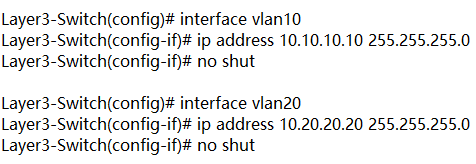
In figure 2, layer 3 switch is configured with IP address 10.0.0.1. VLAN10 and VLAN20, with IP address 10.10.10.10 and IP address 10.20.20.20 respectively are configured on layer 2 switches. These two IP addresses will be the default gateway addresses for hosts belonging to VLAN10 and VLAN20 on the layer 2 switches respectively. Also, all interfaces connecting the three switches must be configured as trunk ports to allow VLAN10 and VLAN20 tagged frames to pass between switches. Traffic between VLAN10 and VLAN20 will be routed by the layer 3 switch after configuring inter VLAN routing. These steps can be achieved by VLAN configuration command below.
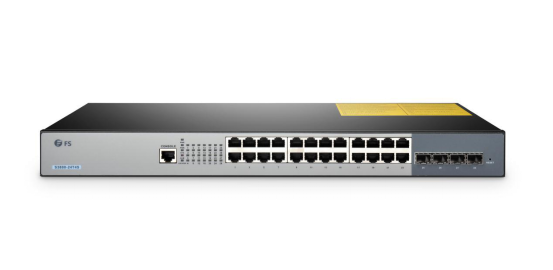
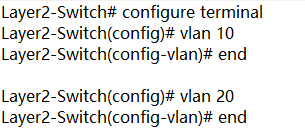
Create VLANs 10 and 20 in the switch database


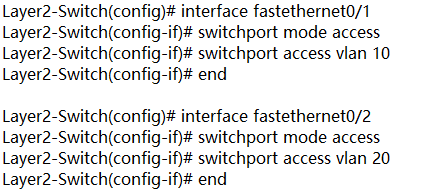
Assign port Fe0/1 in VLAN 10 and port Fe0/2 in VLAN 20

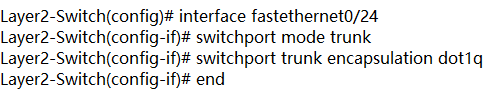
Create trunk port Fe0/24

Enable layer 3 routing and create VLANs 10 and 20 in the switch database

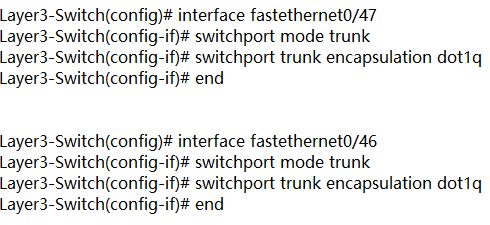
Create trunk ports Fe0/47 Fe0/46

Configure Switch VLAN Interfaces (SVI) to acts as a virtual layer 3 interface on the layer 3 switch

Conclusion

VLAN is created to enable the communication among hosts in different LANs. Inter VLAN routing is developed to realize the exchange among hosts in different VLANs. Inter VLAN routing on layer 3 switch without a router is also approachable with the development of technology. For more configuration about network switches, please refer to our website www.fs.com.

Friday, September 21, 2018

Can a Layer 3 Switch be Used as a Router?

With the development of technology, network switch grows not only in speed like the migration from gigabit Ethernet switch, to 10gb switch, 40gb switch and 100gb switch, but also in complexity to acquire more functions and meet complicated conditions. Layer 3 switch is equipped with advanced functions and is sometimes compared with a router by people. What are layer 3 switch and router? Can a layer 3 switch act as a router? This post will focus on this problem.
What Is Layer 3 Switch and How It Works?
The data switch is a layer 2 switching device that dynamically transmits packets according to the physical addresses (MAC addresses) of connected devices. Layer 3 switch, on the basis of the data switch, boasts additional routing decisions by inspecting the IP addresses. Layer 3 switches are thus able to segregate ports into separate virtual LANs (VLANs) and perform the routing between them. Additionally, this switch helps reduce the amount of broadcast traffic, simplify security management, and improve fault isolation.

What Is Router and How It Works?
A router works at layer 3 of the OSI Model (Network). It is a device usually located at gateways where networks meet, to connect various local networks and wide networks. It decides where to send packets by utilizing an IP Routing table. When an IP packet comes in, the router looks up the destination IP in the IP Routing table. If that destination IP is not found in the table, the router will drop the packet. The router can perform NAT to translate the private IP address to public address, which can get you into the Internet. So it is a common network device in household use.
Can a Layer 3 Switch be Used as a Router?
As a layer 3 switch possesses the routing function of a router, can we replace a router with it? Let’ s have a detailed view of their similarities and disparities.

Layer 3 Switch Vs Router: Similarity

Both layer 3 switch and router work at layer 3 of the network. Layer 3 switches technically have a lot in common with traditional routers. Both of them can support the same routing protocols, inspect incoming packets and make dynamic routing decisions based on the source and destination addresses inside. The switches can also be configured to support routing protocols such as RIP, OSPF, and EIGRP.

Layer 3 Switch Vs Router: Disparity

Internally, the hardware inside a layer 3 switch blends that of traditional switches and routers. As for packet forwarding, router transmits packet by a microprocessor-based software routing engine, while the switch performs switching through hardware. After routing the first data flow, the layer 3 switch will generate a mapping table of MAC addresses and IP addresses, so that the same data flow will directly pass through the layer 2 according to this table, thus eliminating network delay and improving the efficiency of packet forwarding. Externally, layer 3 switches do not offer the WAN-type ports as standard routers do, so they lack WAN functionality.
Router requires configurations before deployment due to the inbuilt operating system. On the contrary, the layer 3 switch is usually ready to go when acquired, and configurations are optional as you like.
From a software perspective, layer 3 switches are not capable of the extra services that routers typically provide, such as NAT and NetFlow.
Conclusion
All in all, it is not recommended to replace a router with layer 3 switch, but you can apply them in the same network at the same time. In addition, whether a layer 3 switch can supplant a router relies upon the switch model and what you expect from it. Some layer 3 switches are almost router substitutions, with a full scope of WAN, firewall, VoIP, and so on. However, those switches are costly, and most layer 3 switches just have Ethernet ports. In this way, a dedicated router is cost-effective than a layer 3 switch.

Friday, September 14, 2018

Bend Radius—How It Can Impact Your Cable Performance?

Why should fiber optic cable not be tightly bent? Are fiber optic cable fragile? These issues are what users care about when deploying fiber patch cables. Usually, fiber optic cable is made from two bend sensitive materials: plastic or glass. It is broken easily when kinked or bent too tightly to exceed the minimum bend radius of cable. Then which factor will influence bend radius? How to choose cables according to it? This blog will provide some hints.

Why Bend Radius Is Important?

When you deploy the fiber optic cable, it is inevitable to flex, pull and bend it due to the practical conditions. However, it is the bend radius that determines how much you can bend a cable. It represents as the safe value that can prevent your cable from damaging or degrading its performance. If a cable is bent beyond its allowed radius, it will generate crosstalk or interference in data transmission, or even shorten its life. That’s why it’s important to know the bend radius of the cables, especially the minimum bend radius,which is the smallest allowed radius the cable can be bent around without signal loss or impairment.

Factors Impact Bend Radius of Cable

The bend radius may differ from cables. The fact is the smaller the minimum bend radius, the more flexible the cable. Here list some factors that may affect this radius of cable.
  • Outer Jacket Thickness
The thickness of the outer jacket of a fiber patch cable intended for bending will influence the potential minimum curve radius. Generally speaking, if the outer jacket is thick, the fiber patch cable will have a smaller bend radius. This can be translated by the fact that when the cable is bent, the stretching force makes the outer jacket thinner and even broken. Therefore, if the outer jacket is thin itself, the external tension may deform of break the fragile cable.
  • Material Ductility
Cables are manufactured by different materials, and this will affect the radius of the bend. Ductility refers to the flexibility of material under tensile stress or stretching force. If you would like to obtain small curve radius, you should choose cables made of highly ductile materials like copper. An alternative such as glass is more brittle than flexible.
  • Core Diameter
The large core diameter determines the small bend radius. Simply put, the single mode fiber has a smaller diameter than multimode fiber, and the single mode fiber cable bears less weight or bending than multimode fiber cable. That’s why the bending radius of single mode fiber optic cable is larger than the multimode fiber optic cable.

How to Choose Fiber Optic Cables based on Bend Radius?

Generally, the multimode fiber optic cable is recommended if the bend radius is the only consideration. And another option is BIF fiber cable. BIF means the bend insensitive fiber which enables tight curve radius when cables are bent or twisted. FS adopts it in producing both multimode and single mode fiber cables to endow them much smaller bend radii than ever before. It realizes more convenience in cable management, as well as less signal loss and less cable damaging. Here is a bend radius chart of BIF fiber optic cable.
Fiber Cable Type
Minimum Bend Radius
OM3/OM4 MTP BIF
7.5mm
Single Mode OS2 MTP BIF
10mm
Uniboot OS2 LC BIF
10mm
Uniboot OM3/OM4 LC BIF
7.5mm

Conclusion

To sum up, the bend radius of cables is paramount for fiber patch cable installations. Factors which influence the minimum radius of fiber optic cable include the outer jacket thickness, material ductility and core diameter. To protect the integrity and performance of cable, we shall not bend the cable beyond its allowed radius.