Showing posts with label layer 3 switch. Show all posts

Wednesday, October 3, 2018

How to Configure Inter VLAN Routing on Layer 3 Switches?

With the development of technology, no matter how far you are away from families, you can communicate with them at any time in any places. The same is true to the optic communication, regardless of the physical locations of two hosts or the different VLANs they belong to, they can exchange with each other by inter VLAN routing. Then what is inter VLAN routing and how to configure inter VLAN routing on layer 3 switches?

What Is Inter VLAN Routing?

In figure 1, three computers connected to a gigabit Ethernet switch form a LAN (local area network) within a limited area. However, they cannot communicate with hosts in another LAN, because there is no connection between these Ethernet switches. Then there comes the VLAN which provides us with logical separation or segmentation of our networks to facilitate communication among hosts in different LANs. However, each VLAN is a unique broadcast domain, so computers on separate VLANs are unable to communicate with each other by default. There is a way to solve the problem, and that’s what we are going to shed light on—inter VLAN routing.

Fig. 1 LAN and VLAN in Networking
The process of forwarding network traffic from one VLAN to another VLAN using routing is known as inter-VLAN routing. One of the ways to carry out inter-VLAN routing is by connecting a router to the switch infrastructure. When using a router to facilitate inter-VLAN routing, the router interfaces can be connected to separate VLANs. Devices on those VLANs communicate with each other via the router. Apart from that, a more convenient way is introduced—configure inter VLAN routing on layer 3 switches. Layer 3 switching is more scalable than a router which only provides a limited number of available ports.

How to Configure Inter VLAN Routing on Layer 3 Switches?

To enable a layer 3 switch to perform routing functions, the switch must have IP routing enabled. 10gb Ethernet switch and 40gb Ethernet switch are recommended for working as layer 3 switch.

Fig.2 Inter VLAN Routing on Layer 3 Switches
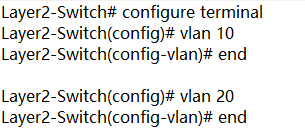
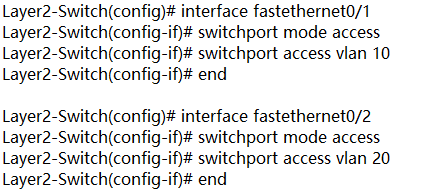
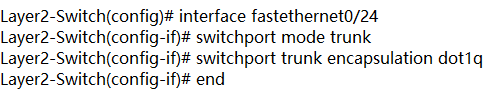
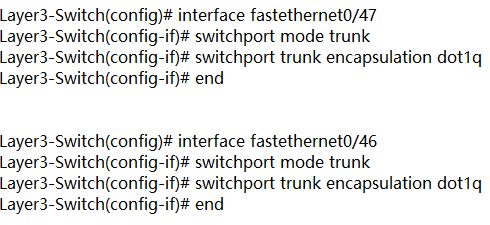
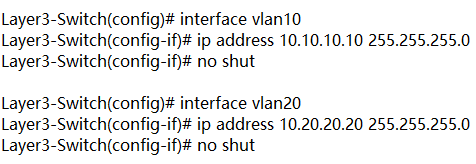
In figure 2, layer 3 switch is configured with IP address 10.0.0.1. VLAN10 and VLAN20, with IP address 10.10.10.10 and IP address 10.20.20.20 respectively are configured on layer 2 switches. These two IP addresses will be the default gateway addresses for hosts belonging to VLAN10 and VLAN20 on the layer 2 switches respectively. Also, all interfaces connecting the three switches must be configured as trunk ports to allow VLAN10 and VLAN20 tagged frames to pass between switches. Traffic between VLAN10 and VLAN20 will be routed by the layer 3 switch after configuring inter VLAN routing. These steps can be achieved by VLAN configuration command below.
Create VLANs 10 and 20 in the switch database


Assign port Fe0/1 in VLAN 10 and port Fe0/2 in VLAN 20

Create trunk port Fe0/24

Enable layer 3 routing and create VLANs 10 and 20 in the switch database

Create trunk ports Fe0/47 Fe0/46

Configure Switch VLAN Interfaces (SVI) to acts as a virtual layer 3 interface on the layer 3 switch

Conclusion

VLAN is created to enable the communication among hosts in different LANs. Inter VLAN routing is developed to realize the exchange among hosts in different VLANs. Inter VLAN routing on layer 3 switch without a router is also approachable with the development of technology. For more configuration about network switches, please refer to our website www.fs.com.

Friday, September 21, 2018

Can a Layer 3 Switch be Used as a Router?

With the development of technology, network switch grows not only in speed like the migration from gigabit Ethernet switch, to 10gb switch, 40gb switch and 100gb switch, but also in complexity to acquire more functions and meet complicated conditions. Layer 3 switch is equipped with advanced functions and is sometimes compared with a router by people. What are layer 3 switch and router? Can a layer 3 switch act as a router? This post will focus on this problem.
What Is Layer 3 Switch and How It Works?
The data switch is a layer 2 switching device that dynamically transmits packets according to the physical addresses (MAC addresses) of connected devices. Layer 3 switch, on the basis of the data switch, boasts additional routing decisions by inspecting the IP addresses. Layer 3 switches are thus able to segregate ports into separate virtual LANs (VLANs) and perform the routing between them. Additionally, this switch helps reduce the amount of broadcast traffic, simplify security management, and improve fault isolation.

What Is Router and How It Works?
A router works at layer 3 of the OSI Model (Network). It is a device usually located at gateways where networks meet, to connect various local networks and wide networks. It decides where to send packets by utilizing an IP Routing table. When an IP packet comes in, the router looks up the destination IP in the IP Routing table. If that destination IP is not found in the table, the router will drop the packet. The router can perform NAT to translate the private IP address to public address, which can get you into the Internet. So it is a common network device in household use.
Can a Layer 3 Switch be Used as a Router?
As a layer 3 switch possesses the routing function of a router, can we replace a router with it? Let’ s have a detailed view of their similarities and disparities.

Layer 3 Switch Vs Router: Similarity

Both layer 3 switch and router work at layer 3 of the network. Layer 3 switches technically have a lot in common with traditional routers. Both of them can support the same routing protocols, inspect incoming packets and make dynamic routing decisions based on the source and destination addresses inside. The switches can also be configured to support routing protocols such as RIP, OSPF, and EIGRP.

Layer 3 Switch Vs Router: Disparity

Internally, the hardware inside a layer 3 switch blends that of traditional switches and routers. As for packet forwarding, router transmits packet by a microprocessor-based software routing engine, while the switch performs switching through hardware. After routing the first data flow, the layer 3 switch will generate a mapping table of MAC addresses and IP addresses, so that the same data flow will directly pass through the layer 2 according to this table, thus eliminating network delay and improving the efficiency of packet forwarding. Externally, layer 3 switches do not offer the WAN-type ports as standard routers do, so they lack WAN functionality.
Router requires configurations before deployment due to the inbuilt operating system. On the contrary, the layer 3 switch is usually ready to go when acquired, and configurations are optional as you like.
From a software perspective, layer 3 switches are not capable of the extra services that routers typically provide, such as NAT and NetFlow.
Conclusion
All in all, it is not recommended to replace a router with layer 3 switch, but you can apply them in the same network at the same time. In addition, whether a layer 3 switch can supplant a router relies upon the switch model and what you expect from it. Some layer 3 switches are almost router substitutions, with a full scope of WAN, firewall, VoIP, and so on. However, those switches are costly, and most layer 3 switches just have Ethernet ports. In this way, a dedicated router is cost-effective than a layer 3 switch.